


Field requests from anywhere, any device
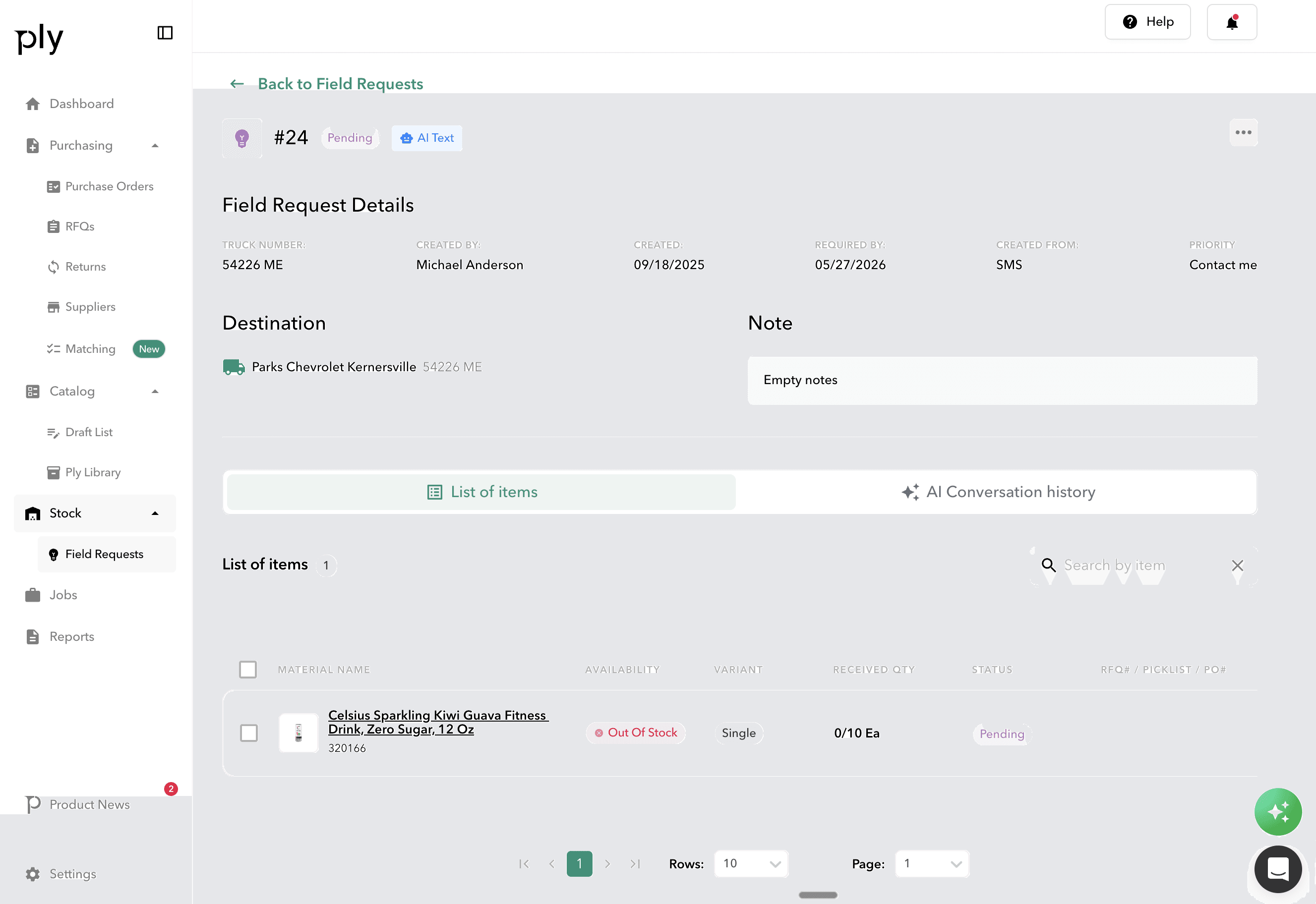
Empower technicians to request materials from anywhere — via the mobile app, SMS, voice, or AI chat — and track fulfillment in real-time. Five priority levels and six status states keep every request organized.
How it works
Field Requests in Ply follows a clear, structured workflow.
Request
Technicians submit material requests via their preferred method — mobile app, SMS, voice, or AI chat. Specify materials, quantities, priority, location, and delivery preferences.
Process
Warehouse staff receive the request with priority-based notifications. Requests can convert to Purchase Orders, Pick Lists, or RFQs with bulk conversion support.
Fulfill
Per-item quantity tracking monitors requested, received, and pending amounts. Partial fulfillment keeps jobs operational while remaining items are sourced.
Complete
All requested items are received and delivered. Inventory updates automatically and fulfillment data feeds into analytics for performance tracking.
Key benefits
Voice and AI input
Hands-free request creation using natural language processing. Ply matches spoken or typed descriptions to catalog items with clarification when needed.
Five priority levels
Low, Medium, High, Urgent, and Contact Me. Color-coded urgency levels with configurable defaults so critical requests get immediate attention.
Convert to actions
Transform requests into Purchase Orders, Pick Lists, or RFQs with a single click. Bulk conversion support handles multiple requests at once.
Partial fulfillment
When not everything is available immediately, partial fulfillment delivers what is in stock while remaining items continue processing. Jobs keep moving.
Unrecognized material handling
When a tech requests something not in the catalog, it gets flagged for manual review and potential catalog addition — keeping your item database growing.
Core capabilities
Multiple input methods
Mobile app, SMS, voice, AI chat, and phone call. Technicians use whatever method is fastest in the field.
Material selection
Full catalog search, barcode scanning, and unrecognized item entry with AI-assisted matching to existing catalog items.
Fulfillment tracking
Per-item quantity tracking with requested, received, and pending amounts. Activity logs and linked document history for full visibility.
Role-based configuration
Configurable by role — Tech, Manager, and Admin — with location tracking that supports job and truck-based fulfillment workflows.
Works with your existing tools




Ready to see Field Requests in action?
Book a demo and see how Ply helps trades businesses streamline field requests and take control of their inventory.