 Case Studies
 ROI Calculator
 Free PO Generator
 Blog
Blog Onsite Implementation
 Field Requests
 Videos Archive
Purchase order and inventory management software is something most businesses know they need, but they may not know where to start.
If you run a contracting business, materials are constantly moving through your operation. Parts are ordered from suppliers, received into warehouses, stocked in service trucks, and used on jobs throughout the day. At any given moment, dozens or even hundreds of items may be in transit between locations. For many contractors, materials represent one of the largest operating expenses in the business, which means that even small inefficiencies in purchasing and inventory management can quietly erode profitability over time.
In theory, the process should be straightforward. You order materials, receive them, track them as inventory, and allocate them to jobs as needed.
In reality, most contractors manage these activities across several disconnected tools. Purchase orders might be created in accounting software. Inventory counts might live in spreadsheets. Truck stock might be tracked informally or not tracked at all. Field technicians often rely on memory, handwritten notes, or texts to figure out what parts they have available. The result is a system that works just well enough to get by, until growth exposes the cracks.
Over time, these disconnected workflows create friction everywhere. Duplicate orders happen because no one is completely sure what is already in stock. Technicians make emergency supply house runs because inventory visibility is limited. Shelves slowly fill with excess materials that tie up cash. And when it comes time to analyze job profitability, the material costs rarely tell a clear story. That is exactly why more contractors are looking for purchase order and inventory management software that can connect these workflows and bring structure to material operations.
Instead of treating purchasing and inventory as separate activities, these platforms connect them into one operational workflow. Purchase orders update inventory automatically. Materials can be tracked across warehouses, trucks, and job sites. Managers gain real-time visibility into stock levels, supplier orders, and material usage. For contractors who rely heavily on materials to complete jobs, that visibility can significantly improve operational efficiency, financial performance, and customer experience.
This guide explains how purchase order and inventory management software works, why contractors need it, what features matter most, how to compare leading platforms, and how to choose the right system for your business.
Key takeaways
- Purchase orders and inventory should live in the same system: When purchasing and inventory tracking are disconnected, stock levels quickly become unreliable and purchasing decisions become guesswork.
- Contractors need field-aware inventory tools: Many inventory systems are built for retail warehouses, not businesses managing truck stock, jobsite materials, and technician usage in the field.
- Better material visibility improves profitability: When purchasing and inventory are connected, contractors reduce waste, prevent shortages, improve job costing, and make smarter buying decisions.
What is purchase order and inventory management software?
Purchase order and inventory management software is a system that allows businesses to manage purchasing, receiving, and inventory tracking within one centralized platform. Instead of juggling spreadsheets, accounting tools, supplier emails, and handwritten notes, teams can manage the entire lifecycle of materials from a single system.
At a basic level, the software connects several workflows that are often fragmented in contractor businesses. Teams create purchase orders for materials needed for upcoming work. Those orders are sent to suppliers and tracked until they are fulfilled. When materials arrive, they are received into inventory and stock levels update automatically. As technicians use those materials on jobs, the system records that usage and deducts inventory accordingly.
The result is a clear operational chain that runs from supplier purchase to inventory receipt to job usage. Every movement of material is visible and recorded. Without this kind of integration, materials often disappear into blind spots. Businesses may know what they ordered and what they used in broad terms, but they rarely have a precise understanding of what is actually available at any moment.
That lack of visibility is not a small issue. According to the Association for Supply Chain Management, inventory visibility and purchasing coordination are two of the most important drivers of operational efficiency in material-intensive businesses. Contractors feel that reality every day, whether they describe it that way or not.
A quick overview of how contractors are transforming inventory management with Ply
Why contractors struggle with purchasing and inventory management
Many contracting businesses grow rapidly before they ever implement structured inventory systems. Early on, it is possible to manage materials with simple tools because the number of parts, suppliers, and jobs is still relatively small. A spreadsheet may feel good enough. A whiteboard in the warehouse may seem manageable. A tech may know what is in the truck from memory.
As the company grows, that informal system becomes harder to sustain. Multiple technicians may draw from the same inventory pool. Warehouses may expand. Trucks carry dozens or hundreds of commonly used parts. Purchasing volume increases. Supplier relationships multiply. And the business becomes more dependent on knowing exactly what is on hand, what is committed to jobs, and what needs to be reordered.
Purchasing decisions happen without accurate inventory data
When stock levels are unclear, purchasing becomes reactive. Managers frequently reorder materials simply because they cannot confirm whether those items already exist somewhere in the system. That leads to duplicate purchasing, excess stock, and unnecessary spend.
Emergency supply runs become common
Technicians who cannot easily check inventory levels before heading to a job often make additional trips to supply houses during the workday. Those trips increase labor time, fuel costs, and overall project expenses. They also slow down service, delay the next appointment, and frustrate customers.
Overstock quietly drains working capital
To avoid shortages, many companies overbuy. Over time, shelves fill with slow-moving or rarely used parts that tie up cash and reduce purchasing efficiency. Inventory starts to feel like safety, but too much of it becomes dead weight.
Job costing becomes unreliable
Materials are often one of the largest cost drivers in trade businesses. If those materials are not tracked accurately from purchase to usage, job profitability becomes difficult to calculate. That makes it harder to understand which types of work are truly profitable and where margin leakage is happening.
Most of these problems come back to the same issue. Purchasing and inventory tracking live in different systems that do not communicate with one another. The business ends up operating with fragmented data and limited visibility.
How purchase order and inventory management software works
Modern inventory platforms bring purchasing and stock management together into one operational workflow. Each stage of the material lifecycle is tracked within the same system, which makes it easier to understand what is happening across the business at any point in time.
Creating purchase orders
Managers create purchase orders directly within the platform. These purchase orders typically include supplier information, item quantities, pricing, expected delivery dates, and, in some cases, the job or location the materials are intended for. Some systems can also generate purchase orders automatically when stock falls below predefined reorder points.
Sending and tracking supplier orders
Once the purchase order is generated, it can be sent to suppliers and tracked through the system. Managers can see which orders are pending, partially fulfilled, delayed, or completed. This visibility helps prevent duplicate orders and simplifies supplier communication.
Receiving inventory
When materials arrive, they are received against the original purchase order. The receiving process confirms quantities and updates inventory levels automatically. This is where the connection between purchasing and inventory becomes especially valuable. The system no longer treats the order as separate from the stock. It becomes one continuous workflow.
Using barcodes and QR codes to improve accuracy
Many modern systems use barcodes or QR code workflows to speed up receiving, transfers, and counts while reducing human error. For contractors, scanning technology is especially useful because inventory moves constantly between warehouses, trucks, and jobsites. Instead of manually entering part numbers or counting from memory, teams can scan materials as they move through the business.
Tracking inventory across multiple locations
Contractors rarely store materials in one place. Inventory may exist across warehouses, service vehicles, job trailers, storage yards, and active jobsites. Purchase order and inventory management software tracks materials across all of these locations. When materials move from a warehouse to a truck, or from a truck to a jobsite, the system updates inventory counts in real time.
Recording material usage
When technicians use materials on jobs, the system records that usage and deducts inventory automatically. This ensures stock counts remain accurate and helps connect material costs to specific jobs or service calls.
Reporting and purchasing insights
With purchasing and inventory data stored in one system, businesses gain access to much better operational insight. Managers can monitor inventory turnover, evaluate supplier performance, identify slow-moving stock, track reorder patterns, and make better decisions about what to stock, where to stock it, and when to buy it. Guidance from the U.S. Small Business Administration consistently highlights the importance of structured purchasing and inventory oversight for improving financial planning in growing businesses.
The right software should support how trade businesses work in the field, not just how products move through a traditional warehouse.
What to look for in purchase order and inventory management software
Not every inventory platform offers the same capabilities, and not every system that includes purchase orders is actually built for the realities of contractor operations. The right software should support how trade businesses work in the field, not just how products move through a traditional warehouse.
✓ Purchase order automation
Effective systems allow teams to create, send, and manage purchase orders quickly. Some platforms automate reorder suggestions or generate purchase orders when stock hits a predefined threshold. That can reduce manual work and help teams stay ahead of shortages.
✓ Real-time inventory visibility
Inventory counts should update automatically whenever materials are received, transferred, or used. Real-time visibility ensures purchasing decisions are based on accurate data instead of assumptions or stale reports.
✓ Truck stock management
For many contractors, a large portion of inventory lives in service vehicles. The software should allow teams to track truck inventory the same way they track warehouse stock. If a system cannot handle truck stock cleanly, it is not going to fit the day-to-day needs of many trade businesses.
✓ Barcode and QR code scanning
Scanning technologies like barcodes and QR codes make it much easier to receive inventory, perform cycle counts, transfer materials, and log usage. Contractors that want cleaner, faster material workflows often start by exploring QR code inventory systems because they reduce manual entry and help teams trust the data.
✓ Multi-location inventory management
Businesses that operate across several warehouses, trucks, and jobsites need the ability to track inventory across all of those locations. A single-location system may work for a small storage room, but it breaks down quickly when inventory is distributed.
✓ Supplier management
Strong purchasing tools store supplier contact information, pricing history, lead times, and order records so teams can manage vendor relationships more effectively and compare suppliers more easily.
✓ Accounting and FSM integrations
The right inventory software should not create yet another data silo. It should integrate with your existing accounting and field service tools so purchasing, inventory, and invoicing stay aligned. This is especially important for businesses using platforms like QuickBooks, ServiceTitan, Jobber, or Sage Intacct.
Benefits of connecting purchase orders and inventory management
When purchasing and inventory operate within the same system, the impact reaches far beyond the warehouse. It affects scheduling, technician productivity, customer experience, cash flow, and profitability. This is one reason more contractor businesses are moving away from spreadsheets and disconnected workflows toward software built to unify material operations.
Improved purchasing accuracy
Managers can see exactly what is available before placing new orders. That reduces duplicate purchasing and unnecessary stock accumulation. It also helps teams consolidate orders and make smarter buying decisions.
Reduced material waste
Centralized inventory tracking prevents materials from disappearing across trucks, warehouses, and jobsites. Businesses gain a better understanding of what is actually being used and what is simply sitting. That helps reduce shrinkage, spoilage, and forgotten stock.
Faster field operations
Technicians can confirm inventory availability before beginning work, which reduces unnecessary supply house trips and delays. When field teams trust the stock data, they can plan better and complete more work on the first visit.
Better financial visibility
Because materials flow from purchasing directly into job usage records, financial reporting becomes more accurate. That makes it easier to understand margins, job costs, and where materials are affecting profitability.
Stronger supplier relationships
Centralized purchasing data allows businesses to evaluate supplier performance, monitor lead times, and negotiate pricing from a stronger position. It is much easier to improve purchasing when you can actually see the order history and outcomes.
Purchase order and inventory management software comparison
Several platforms offer both purchasing and inventory functionality, but they differ significantly in how well they support contractor workflows. Some are built for manufacturing. Others are designed for e-commerce or enterprise operations. A few are purpose-built for the trades. The chart below gives a high-level comparison.
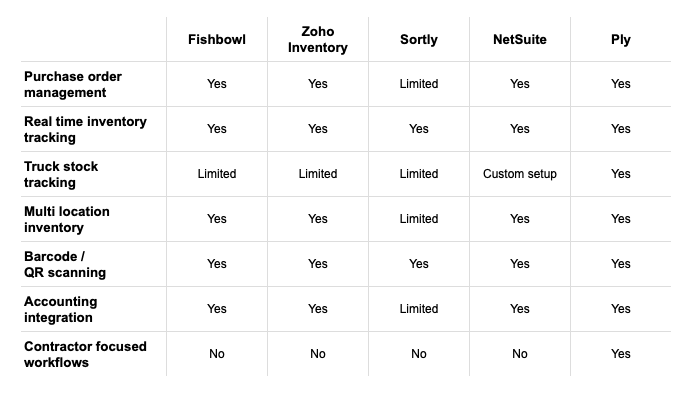
A head-to-head look at top purchase order and inventory management platforms
Choosing software is easier when you understand what each system was built to do. Some platforms are designed for large enterprises. Others are better suited to general small business inventory. And some are specifically designed to solve contractor material management problems.
1. Ply: Built for contractor workflows
Ply is designed specifically for contractors who need to manage materials across warehouses, trucks, and jobsites. Instead of focusing only on warehouse inventory, Ply supports real-world field workflows like truck stock management, purchase order tracking, technician material usage, and integrations with field service and accounting platforms. Businesses evaluating contractor-focused solutions often start by comparing inventory management software built for the trades rather than trying to adapt a general-purpose system.
2. NetSuite: The enterprise-level option
NetSuite is a full ERP platform that includes purchasing, inventory, accounting, and financial management. It is powerful and broad, but for many small to mid-sized trade businesses, that breadth can also create complexity. It may be more system than the business actually needs if the main goal is to improve material operations, purchasing, and truck stock visibility.
3. Fishbowl: Strong for manufacturing-oriented inventory
Fishbowl is a well-known inventory platform, especially for businesses with manufacturing or assembly workflows. It offers solid purchasing and stock tracking features, but it is not purpose-built for contractor operations. For service-based businesses, the manufacturing-centric workflow may feel like an awkward fit compared to a system designed around field usage and truck stock.
4. Zoho Inventory: A general small business option
Zoho Inventory is part of the broader Zoho ecosystem and works well for many general small business use cases. It can be a reasonable option for businesses already using Zoho tools, but its generalist approach may leave contractors wanting stronger job-specific and field-specific workflows.
5. Sortly: Easy to use, but lighter on depth
Sortly is popular for its simplicity and visual approach to inventory, but its purchasing capabilities are more limited than more comprehensive inventory platforms. It may work for basic tracking, but many growing contractors will need more robust purchasing, usage, and integration capabilities.
Click here for the full story on how Four Quarters Mechanical transformed its inventory management with Ply
Strengths and weaknesses of each platform
Every inventory system has bright spots and blind spots. The goal is not to find a perfect tool in the abstract. It is to find the one whose strengths match your workflow and whose weaknesses will not create daily friction.
Ply: Pros and cons
Ply’s biggest advantage is focus. It is built for the trades, which means features like truck stock, warehouse flows, field usage, and FSM integrations are not afterthoughts. That specialization helps businesses streamline material management without getting buried under features they will never use. The tradeoff is that businesses looking for a massive enterprise suite with every adjacent back-office function in one place may prefer a broader ERP.
NetSuite: Pros and cons
NetSuite offers deep reporting and broad operational coverage. For very large companies with complex organizational needs, that can be a major advantage. The downside for most contractors is complexity, cost, and implementation overhead. It can be more cumbersome than necessary for businesses that mainly need better control over purchasing and inventory.
Fishbowl: Pros and cons
Fishbowl brings strong inventory features, especially for manufacturing use cases. That makes it compelling for businesses assembling products or managing more traditional production flows. The drawback is that many contractors are not trying to run a factory. They are trying to get the right materials to the right technician at the right time, which is a different challenge.
Zoho Inventory: Pros and cons
Zoho Inventory benefits from the larger Zoho ecosystem and can be appealing for companies already committed to that stack. The limitation is that it was not built around contractor workflows. Businesses may find themselves adapting their processes to the software rather than the other way around.
Sortly: Pros and cons
Sortly is approachable and easy to learn, which can be valuable for teams new to inventory software. The tradeoff is depth. It may not provide enough structure for businesses that need stronger purchasing controls, integrations, and distributed inventory management across multiple trucks and locations.
The price you see on a software website is just the starting point. To understand the true cost, you need to look beyond the monthly subscription and think about the total investment.
What is the real cost of purchase order and inventory software?
The price you see on a software website is just the starting point. To understand the true cost, you need to look beyond the monthly subscription and think about the total investment. That includes implementation, data migration, training, and support. But it also includes the opportunity cost of staying with a broken system.
Subscription pricing is only one piece
Most inventory platforms use subscription pricing based on users, features, or both. That keeps costs relatively predictable, but it is only part of what matters. A lower monthly fee is not a bargain if the software creates more manual work, lacks critical integrations, or cannot support your actual workflow.
Implementation and onboarding matter
Some providers charge additional fees for setup, training, or data migration. Others provide more hands-on onboarding to help the business organize warehouses, standardize parts, and train teams. That support can make a major difference in how quickly the software delivers value.
The cost of doing nothing is usually higher than it looks
When businesses stay with manual purchasing and spreadsheet inventory, the hidden costs add up quickly. There is the labor lost to extra supply house runs, the cash tied up in overstock, the revenue lost when jobs are delayed, and the margin leakage caused by inaccurate job costing. These are not always obvious line items, but they are very real.
ROI should be part of the decision
The right platform should not just cost money. It should save or generate it. Contractors evaluating software should look at time saved, waste reduced, stockouts prevented, and the potential increase in first-time fix rates. That is why some businesses use a tool like Ply’s ROI calculator to estimate the financial impact before making a decision.
Which software integrates best with your existing tools?
Inventory software should not be an island. To create real operational improvement, it needs to communicate with the systems your team already relies on every day. Strong integrations eliminate double entry, reduce errors, and help information flow smoothly from the field to the office.
Field service management connections
For contractor businesses, the connection between inventory and field service management is essential. When these systems are aligned, technicians can see what parts are available, log usage more easily, and ensure materials used on a job are reflected accurately. Strong FSM integrations create a cleaner workflow from scheduling to completion.
Accounting software sync
Connecting inventory to accounting platforms like QuickBooks or Sage Intacct helps ensure purchasing and financial records stay aligned. It simplifies job costing and reduces manual back-office work.
Supplier and purchasing workflows
A good inventory system should also simplify the buying process itself. Strong purchase order workflows, supplier visibility, and centralized order tracking help teams move faster and buy smarter. Contractors looking to improve this part of the process often focus on how the software supports buying and managing materials rather than just counting stock.
Click here for the full story on how Brotherly Love Electric transformed its inventory management using Ply.
What inventory headaches can this kind of software solve?
If you have ever sent a tech to a jobsite only to find out a part that should have been available is missing, you already understand the ripple effect of poor inventory management. That one missing part does not just delay a single task. It burns labor, creates scheduling problems, frustrates customers, and chips away at margins. Multiply that across multiple technicians and multiple jobs each week, and the financial impact becomes significant.
The right software does not just organize your parts. It solves fundamental communication and tracking problems that hold the business back. It creates a single source of truth for your materials, giving everyone from the office manager to the field technician a clearer picture of what you own, where it is, and when you need to order more.
✓ End stockouts and overstock
Purchase order and inventory software gives teams a live view of stock across warehouses and trucks, making it easier to reorder proactively and avoid both shortages and unnecessary excess.
✓ Eliminate manual tracking errors
Spreadsheets, clipboards, and memory are all vulnerable to human error. Automated systems replace guesswork with cleaner, more reliable data. Using tools like barcodes and scanning workflows, every part can be tracked from receipt to job usage. That creates data businesses can trust when they manage purchasing and inventory together.
✓ Improve demand forecasting
Once purchasing and usage data live in one place, businesses can spot patterns more easily. That helps them buy smarter, prepare for seasonal shifts, and keep commonly needed materials in the right locations. For contractors in areas like HVAC, plumbing, and electrical, that can make a major difference in responsiveness and efficiency.
How to choose the right software for your business
The best software choice depends on your workflow, your current pain points, and your growth plans. It is easy to get distracted by feature lists, but the decision should come back to how well the platform supports your trade, your team, and your operating model.
Step 1: Match features to your trade and company size
A plumbing contractor, an electrical contractor, and a general warehouse business do not manage materials the same way. Look for software that actually reflects your workflow. Can it handle truck stock? Does it support field usage? Does it integrate with the tools your team already uses? A platform designed for contractors will usually be a better fit than a generic system loaded with features you do not need.
Step 2: Find a solution that can scale with you
The software that works for a five-truck operation should still work when you have fifteen trucks, more techs, more locations, and more purchasing volume. Think about your goals over the next three to five years and whether the platform can grow with you. Scalability is part of long-term ROI.
Step 3: Use demos and product tours to your advantage
You would not buy a new truck without testing it. Software should be no different. Ask vendors to show exactly how their platform handles warehouse transfers, truck stock, purchase orders, and technician usage. A hands-on product tour can reveal a lot about whether the system will actually work for your team.
How to make your final decision
By the time you narrow your shortlist, the decision is not just about software. It is about choosing a platform that will become part of your daily operations for years to come. That means you need to think about both the product and the partner behind it.
Prioritize your must-have features
Before getting swayed by a long list of nice-to-haves, define your non-negotiables. For many contractors, those include truck stock tracking, strong purchase order management, mobile usage logging, and integrations with accounting and FSM systems.
Weigh implementation timeline and support quality
Implementation matters. Ask how long onboarding typically takes, what help is included, and how the provider supports warehouse setup, data migration, and team training. A provider that offers services like onsite warehouse implementation is often demonstrating a deeper commitment to long-term customer success.
Think beyond the initial setup
The right partner does not disappear after the sale. Ongoing support, responsiveness, and continued product fit matter just as much as the initial feature set. The platform should help your business run better not just in month one, but in year three.
Related articles
- Stock inventory management software for contractors
- 7 best stock inventory management software of 2026
- 5 best construction inventory management software
- Inventory and asset management software: what contractors need to know
Frequently asked questions
What is purchase order management software?
Purchase order management software helps businesses create, track, and manage supplier orders in a centralized system. It makes it easier to see what has been ordered, what is still pending, and what has already been received.
What is inventory management software?
Inventory management software tracks the quantity, location, and movement of materials across warehouses, trucks, and jobsites. It helps businesses maintain accurate stock levels and make better purchasing decisions.
Can inventory software automatically create purchase orders?
Many modern systems can generate purchase orders automatically when inventory levels fall below predefined reorder thresholds. That helps businesses stay ahead of shortages and reduce manual purchasing work.
Why should purchase orders and inventory be connected?
When these workflows are separate, stock data becomes unreliable very quickly. Connecting purchase orders and inventory ensures that stock levels update automatically when materials are ordered and received.
What industries use purchase order and inventory management software?
Construction, field services, manufacturing, retail, and distribution businesses all use these systems. Contractors often need specialized features like truck stock tracking and jobsite inventory visibility.
Does inventory software integrate with accounting platforms?
Most modern systems integrate with accounting software so purchasing and financial records stay synchronized. This is especially useful for job costing and margin visibility.
What is the difference between purchase order software and ERP?
Purchase order software focuses mainly on supplier ordering workflows. ERP platforms go much broader, combining purchasing, inventory, accounting, finance, and other business functions into one larger system.
Can contractors manage truck inventory with inventory software?
Yes. Contractor-focused inventory systems are designed to track materials stored in service vehicles as well as warehouses and jobsites. This is one of the most important differences between trade-specific and general inventory software.
How does inventory software improve job costing?
When materials are tracked from purchase to job usage, contractors gain a much clearer understanding of true project costs. That improves pricing decisions, profitability analysis, and overall financial visibility.
Is purchase order and inventory software worth it for a smaller contractor?
In many cases, yes. Even smaller contractors can lose significant time and money to stockouts, overbuying, and poor visibility. Once purchasing volume and field inventory become hard to manage manually, software often pays for itself by reducing those inefficiencies.
What should contractors look for first when evaluating inventory software?
The most important starting point is workflow fit. Look for software that supports truck stock, field usage, purchase order management, and integration with the tools your team already uses.
How long does it usually take to implement inventory software?
That depends on the complexity of the business, the state of the existing inventory data, and the level of onboarding support provided. A good vendor should be able to outline a clear implementation process and timeline before you commit.



