Case Studies
 ROI Calculator
 Free PO Generator
 Blog
Blog Onsite Implementation
 Field Requests
 Videos Archive
A lot of contractors end up looking for stock inventory management system software after the same pattern repeats a few too many times: the warehouse says you have it, the truck says it’s missing, and the job still gets held up. On paper, stock inventory software sounds like the right fit. In practice, a lot of these tools fall apart once your team needs real-time counts in the field, cleaner purchasing workflows, and a way to tie material usage back to jobs.
For contractors, inventory problems usually don’t look like classic retail stock problems. They show up as emergency supply runs, techs grabbing parts from the wrong truck, over-ordering because nobody trusts the counts, and job costs that never fully reflect what got used. The right system needs to do more than count items. It needs to reflect how inventory actually moves through your business.
At a glance
Stock inventory management system software helps businesses track quantities, locations, replenishment, and item movement. For contractors, that only works when the system can handle inventory across trucks, warehouses, and job sites instead of assuming everything stays in one stockroom. The best fit is usually not the tool with the longest feature list. It’s the one that matches how your field team actually works and gives you clean visibility into purchasing, usage, and job costs.
- Generic stock systems often work better for retail, e-commerce, or warehouse-only teams than for contractors.
- Contractors need multi-location tracking, mobile workflows, and real-time updates from the field.
- Job-level material tracking matters just as much as on-hand quantity.
- Ply is inventory management software built specifically for contractors.
What is stock inventory management system software?
Stock inventory management system software is software used to track what items a business has, where those items are located, how fast they are being used, and when they need to be reordered. In plain terms, it helps teams keep better control over stock levels, purchasing, transfers, and reporting. For contractors, the definition still applies, but the workflow is different because inventory is constantly moving through the field instead of sitting in one place.
A contractor may have the same fitting, breaker, or valve in a warehouse, two service trucks, a staging area, and an active job site at the same time. That means the system has to do more than log a static quantity. It has to show where material actually is, who used it, and whether that usage should roll into a specific job.
What this software is designed to do
At its core, stock inventory software is supposed to help you keep accurate counts and avoid surprises. Most platforms do that by giving you item records, quantity tracking, location tracking, reorder alerts, purchase order support, and reporting on what is moving fast or sitting too long. Those are useful basics, and contractors absolutely need them.
The problem is that many platforms stop there. They assume one clean inventory flow where items come in, get stored, and go out in a predictable way. Contractor inventory is messier than that. Materials can be received in the warehouse, loaded to a truck, partially used on one job, transferred to another crew, and replenished again before anyone in the office catches up.
Where the general category overlaps with contractor needs
There is real overlap between general stock inventory software and contractor operations. Contractors still need accurate on-hand counts, barcode or QR code workflows, reorder points, purchase orders, and location visibility. Nobody in the trades is above needing a cleaner way to track stock than a spreadsheet and a whiteboard.
That’s why this category matters. The general software market is solving a real problem. Contractors just need to evaluate those tools through a field operations lens instead of assuming a good small business inventory app will automatically work for service and project-based work.
Where generic stock systems break for contractors
Generic stock systems usually break when inventory stops behaving like shelf stock. They may support multiple locations, but not in a way that feels natural for trucks, crews, temporary job sites, and changing field conditions. They may track quantity well, but not material usage by job. They may offer a mobile app, but not one your field team will actually keep updated during a busy day.
That gap matters because inventory accuracy is not just an operations issue for contractors. It affects labor efficiency, purchasing discipline, customer service, and gross margin. If a system can’t reflect how materials move in the real world, your counts still drift and your team still works around the software.
Why stock inventory problems happen in contracting businesses
Stock inventory problems in contracting usually happen because inventory is moving faster than the system designed to track it. The issue is rarely that a business has no process at all. The issue is that the existing process depends on delayed updates, manual cleanup, and too many disconnected tools.
When a contractor says inventory is a mess, they usually mean the numbers in the office don’t match what is actually out in trucks, warehouses, or job sites. They also usually mean nobody has a clean answer for where material went, what should be reordered, or whether job costs are complete.
Inventory is constantly moving
In a contracting business, inventory doesn’t stay put. A part might be received at the warehouse in the morning, loaded onto a truck at lunch, and installed on a service call before the office even knows it left the building. Another crew might pull staged material from a job site container while someone else assumes it is still available for another project.
That movement is what makes contractor inventory different from a simple stockroom model. The software has to handle truck stock, warehouse stock, transfers, staged materials, and field consumption without creating friction. If it can’t, your team falls back to text messages, memory, and end-of-day catchup.
Job usage is not captured in real time
One of the biggest reasons inventory goes off the rails is that usage gets recorded late, if it gets recorded at all. Techs are focused on getting the work done, not filling out inventory logs after every material pull. If the workflow is slow or clunky, they skip it. Then somebody in the office has to guess what was used based on invoices, job notes, or what is missing from the truck next week.
That delay creates a chain reaction. Reorder points become unreliable, counts drift, and job costing gets weaker. By the time the business realizes it is short on a high-use item, someone is already making an unplanned supply run.
Manual entry creates duplicate work and blind spots
A lot of contractors are technically tracking inventory, but they’re doing it in three or four places at once. One person updates a spreadsheet. Another enters a purchase order in accounting. A technician sends a text that a truck needs restocking. A warehouse lead keeps notes on paper. None of those systems really agree, and none of them give you a clean source of truth.
Manual entry also creates duplicate work. Your team ends up entering the same information into accounting, field service, and inventory systems, or retyping it because the tools do not connect well. That wastes time, but it also introduces small errors that turn into bigger purchasing and costing problems later.
Purchasing and job costing are disconnected
A lot of stock systems can tell you what you have. Fewer can tell you what was used on a specific job and whether that job is still within budget. That disconnect is a big reason contractors struggle with material margin. The inventory count may eventually get updated, but the cost impact does not always flow back to the job cleanly.
When purchasing and job costing are disconnected, people tend to over-order just to be safe. That ties up cash, creates clutter, and still does not solve the visibility problem. You end up carrying more material because nobody fully trusts the numbers.
Contractors should look for stock inventory management system software that tracks inventory across trucks, warehouses, and job sites, supports fast mobile updates, and connects material usage to purchasing and job costs.
What contractors should look for in stock inventory management system software
Contractors should look for stock inventory management system software that tracks inventory across trucks, warehouses, and job sites, supports fast mobile updates, and connects material usage to purchasing and job costs. That is the short answer. If a system cannot do those things well, it will probably create more cleanup work than real control.
The best software for contractors feels practical in the field. It helps the office see what is happening without depending on perfect manual entry at the end of every day. It also gives managers a clearer picture of replenishment, transfers, and material spend by job.
Multi-location tracking across trucks, warehouses, and job sites
This is one of the most important features for contractors because your inventory does not live in a single location. You need to see what is in the main warehouse, what is assigned to each truck, what is staged for an upcoming project, and what has already been consumed. Some systems call that multi-location inventory, but the label matters less than how usable it is.
For contractors, multi-location tracking has to feel operational, not theoretical. It should be easy to move stock between locations, easy to see where shortages are building, and easy to understand whether a part is available in a warehouse, on another truck, or already committed elsewhere.
Mobile-first inventory workflows
If your field team cannot update inventory from a phone without slowing the day down, the system will not stay accurate. Mobile inventory management is not a nice extra for contractors. It is the main way the software stays tied to reality.
Good mobile workflows make it easy to receive items, transfer stock, scan barcodes or QR codes, adjust counts, and log usage at the point of work. Bad mobile workflows push all the updates back to the office, which means your data is already stale by the time someone touches it.
Real-time updates instead of end-of-day catchup
Real-time inventory matters because contractors make decisions on the fly. Dispatch needs to know what is available before sending someone across town. Warehouse teams need to know what is actually low before creating a replenishment list. Managers need current numbers if they want to trust the system.
A platform that updates inventory in real time reduces the lag between what happened in the field and what the business sees. That does not just improve counts. It helps reduce emergency runs, duplicate ordering, and wasted labor spent hunting for parts that should already be accounted for.
Job-level material tracking and costing
Contractors do not just need to know where inventory went. They need to know where it was used. That is the difference between basic stock control and real operational visibility.
Job-level material tracking helps answer questions that matter to owners and managers. Are jobs consuming more material than expected? Which work types are driving the most replenishment? Are your margins getting squeezed because material usage is not being captured fully? Without that connection, inventory software stays stuck at the counting stage.
Easy purchasing and replenishment workflows
Inventory software should make purchasing cleaner, not harder. When counts are accurate and usage is visible, the system should help your team spot shortages early, create purchase orders faster, and restock the right items without overbuying. That is especially important for fast-moving truck stock and core warehouse items.
The best workflows keep purchasing tied to actual field demand. They do not force your team to rebuild the same reorder logic in separate systems. They also reduce the temptation to buy extra just in case, which is one of the most common ways contractors end up with slow-moving stock and too much cash sitting on shelves.
Integrations with QuickBooks, ServiceTitan, and field service tools
Inventory does not live alone. It touches accounting, service management, purchasing, and job costing. That is why integrations matter so much for contractors. If the inventory system does not connect cleanly to the rest of your stack, your team will end up doing duplicate entry and reconciling data by hand.
For many contractors, that means looking closely at how a platform works with QuickBooks, ServiceTitan, and other field service tools. It is also worth reviewing the software’s broader integrations before you commit, because a system that looks good in a demo can still create a lot of friction if it does not fit the way your business already operates.
Best stock inventory management system software options
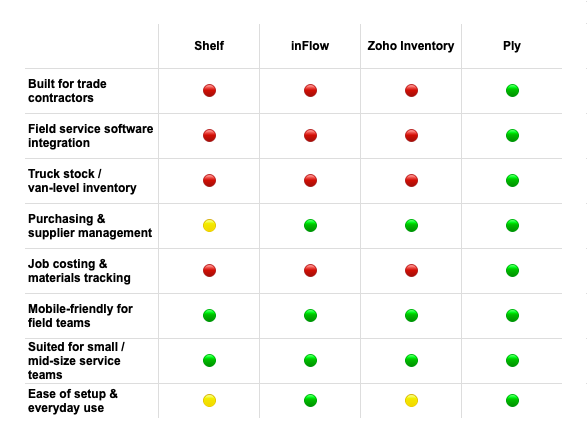
The best stock inventory management system software depends on how your business works. A tool that looks great for retail or e-commerce may still be a poor fit for contractors once you need truck inventory, job-level material tracking, and cleaner field updates. That is why the right comparison is not just feature against feature. It is workflow against workflow.
Below is a contractor-first look at several tools that come up often in this category. Some are good general platforms. Some are better for lightweight tracking. One is built specifically around contractor operations.
1. Ply
Ply is inventory management software built specifically for contractors. That matters because contractors do not manage inventory in a static environment. They are trying to keep up with parts and materials that move between warehouses, trucks, and job sites while also keeping purchasing, replenishment, and job costs under control.
Where Ply stands out is workflow fit. It is designed around the day-to-day reality of trade businesses, not retail counters or e-commerce catalogs. That means contractor teams can track materials across multiple locations, support mobile-first updates, and get real-time visibility into what is on hand and where it is going. It also gives contractors a better path to job-level material tracking so inventory is not disconnected from cost visibility.
It is also easier to position Ply inside a contractor software stack because it is built with field service and accounting workflows in mind. If your team is already thinking about how inventory should connect to operations, purchasing, and accounting, the product overview and Ply’s ROI calculator are useful starting points.
2. Zoho Inventory
Zoho Inventory is a solid general inventory platform for businesses that want centralized stock control, order management, and warehouse visibility. It can be a good fit for businesses with cleaner back-office inventory processes, especially those dealing with online orders, warehouse fulfillment, or straightforward small business stock management.
For contractors, the challenge is context. Zoho can track inventory across locations, but it is still not built around field-first contractor workflows. That means teams may end up adapting their process to the software instead of the other way around. If you need tight job-level material visibility, truck stock workflows, and a system that feels natural for crews in the field, Zoho may feel more generic than helpful.
3. Sortly
Sortly is popular because it is simple. It is easy to understand, visually clean, and often appealing to smaller teams that want a basic way to track tools, parts, or materials without a steep setup process. For contractors just getting out of spreadsheets, that simplicity can be attractive.
The tradeoff is depth. Sortly can work for lightweight inventory visibility, but it often becomes limiting as operations get more complex. Once you have multiple trucks, higher material volume, job costing needs, or a stronger need for purchasing and replenishment control, a simple stock app tends to show its limits pretty quickly.
4. Square
Square is strongest in retail-style environments where inventory is closely tied to point-of-sale workflows. If you run a storefront and need inventory to sync with transactions at the counter, Square makes a lot of sense. It is clean, familiar, and built around selling stocked items in a retail setting.
That same strength is why it is often a weak fit for contractors. Most service contractors are not managing inventory through a store-first workflow. They are moving materials through warehouses, trucks, and jobs, with a lot of usage happening outside the office. Square can help with stock control in the right business, but it is not built around field inventory operations.
5. InvenTree
InvenTree is an open-source inventory platform that can appeal to teams that want flexibility and do not mind technical setup. In the right hands, open-source tools can be powerful because they allow more customization and control than many off-the-shelf products.
For most contractors, though, that flexibility comes with a cost. Somebody has to configure it, maintain it, and make sure it still supports the workflow your team needs. If your business does not have the internal technical bandwidth to own that setup, the software can become one more project to manage instead of a practical operational tool.
Comparison chart
| Software | Best fit | Multi-location tracking | Mobile workflow | Job-level material tracking | Accounting / FSM integrations | Where it breaks for contractors |
|---|---|---|---|---|---|---|
| Ply | Contractors managing inventory across field operations | Built for trucks, warehouses, and job sites | Strong contractor-first mobile workflows | Yes, built around contractor use cases | Designed to fit contractor accounting and field service stacks | Less ideal if you want a generic retail or e-commerce stock tool |
| Zoho Inventory | General small business inventory and order management | Yes | Decent mobile support | Limited contractor-specific workflow depth | Broad business integrations | More generic than field-operations-focused |
| Sortly | Simple, visual tracking for smaller teams | Basic support | Easy to use | Limited | Lighter integration depth | Can get thin fast as contractor operations scale |
| Square | Retail and POS-based inventory | Works for store inventory | Strong for retail use | No contractor-specific focus | Retail ecosystem strengths | Store-first workflow does not map well to field service |
| InvenTree | Teams that want open-source flexibility | Can be configured | Depends on setup | Possible with customization | Depends on implementation | Technical setup and maintenance can outweigh the benefit |
Stock inventory software vs contractor inventory software
The difference between stock inventory software and contractor inventory software is workflow context. General stock software focuses on quantity control, storage locations, and replenishment. Contractor inventory software needs to do that too, but it also has to reflect field movement, truck stock, job consumption, and the way materials affect labor and margin.
This is where a lot of businesses get stuck. They buy a system that is technically capable of tracking stock, then realize months later that it still does not fit the way their crews work or the way managers need to review costs.
Shelf-based inventory vs moving field inventory
General stock systems are often designed around shelves, bins, and fixed storage locations. That is a perfectly valid use case, but it only covers part of what contractors deal with. In the trades, one of your most important inventory locations may be a truck that leaves the yard every morning.
That changes the design requirement. You need a system that can handle movement as a normal part of daily operations, not as an exception. If transfers and field usage are hard to log, the inventory record falls behind almost immediately.
Quantity tracking vs job-linked material tracking
Many inventory platforms can tell you that you had ten units and now you have six. That is helpful, but it does not tell you enough to manage a contracting business well. Contractors need to know where those four units went and whether they were tied to a service call, an install, or a project phase.
Job-linked tracking gives you a cleaner line between inventory control and profitability. It helps answer whether your estimates are holding up, whether crews are using material the way you expect, and whether certain jobs are burning through stock faster than planned.
Generic stock control vs contractor operations visibility
Generic stock control answers inventory questions. Contractor software needs to answer operational questions too. What needs to be restocked before tomorrow’s jobs? Which truck keeps running short on high-use parts? Which warehouse items are getting over-purchased because the field does not trust the counts?
That is a different level of visibility. It is why contractor-focused systems tend to outperform general tools even when the basic feature list looks similar on paper.
Common problems contractors run into with generic stock systems
Generic stock systems usually create problems for contractors when the software looks flexible in a demo but depends on cleaner workflows than most field teams actually have. The issue is not always that the tool is bad. It is that the tool was built for a different operating environment. Once inventory is moving through trucks, warehouses, staging areas, and active jobs, the cracks show up fast.
This section matters because it gets closer to the real questions contractors ask before switching systems. It also helps separate general inventory advice from the field reality that owners and ops managers are dealing with every day.
The counts look fine in the office and wrong in the field
This is one of the most common complaints contractors have with generic inventory software. The system may show the right number on paper, but the field team still cannot find the material when they need it. That usually happens because the system is recording stock at a high level without capturing the last transfer, the last truck restock, or the last job pull in a way that is easy to maintain.
Once that trust breaks, the whole process starts to slide. Techs begin carrying backup stock because they do not trust what the system says. Warehouse teams hold extra material off to the side. Purchasing starts padding orders. The software may still be running, but the business is already building a second unofficial inventory system around it.
The software tracks stock but not the real workflow
A lot of inventory tools can tell you what came in and what should still be on hand. That sounds useful until you look at how contractor teams actually work. Material gets staged early, moved between crews, partially used, returned in odd quantities, and consumed in ways that do not always line up neatly with a fixed warehouse flow.
When the software cannot support that real workflow, the team starts skipping steps. Instead of updating transfers properly, they text each other. Instead of logging usage by job, they rely on memory or paperwork later. That creates a reporting problem, but it also creates an adoption problem because the software starts feeling like extra admin work rather than a useful operating system.
Replenishment becomes reactive instead of planned
One of the biggest promises of stock inventory software is better replenishment. In theory, the system should help you see what is low and reorder before it becomes a problem. In practice, contractors often end up still replenishing reactively because the underlying counts are not trusted enough to drive confident purchasing.
That is how you get stuck in the cycle of emergency supply runs, duplicate purchases, and overstock on the wrong items. The team is technically using inventory software, but the purchasing process still feels manual and last-minute. Adding more automation on top of bad visibility rarely fixes that. Better workflow fit usually does.
Managers still cannot see the real material cost by job
This is where generic inventory software often disappoints leadership teams. Even when it improves count accuracy somewhat, it may still do very little for job-level material visibility. Owners and operations managers want to know more than what is on the shelf. They want to know where margin is slipping and whether material use is staying in line with estimates.
If that connection is weak, inventory software stays stuck as a counting tool instead of becoming a decision-making tool. The business may be more organized than before, but it still does not have a clear view of how material movement is affecting profitability.
How to choose the right system for your team
The right system depends on how much complexity your business actually has today and how much it is likely to have in the next year or two. A very small team with one location and simple stock may get by with a lighter tool for a while. A contractor with multiple trucks, active projects, and tighter margin pressure usually needs something more purpose-built.
The key is being honest about your workflow. Do not choose based only on demo polish or a low starting price. Choose based on whether the software will still fit once your team is busy, your inventory is spread out, and nobody has time for manual cleanup.
Small teams with simple stock needs
If your business is still small, with limited inventory volume and only a few people touching stock, a simple tool may be enough at first. In that stage, the biggest win is often just getting out of spreadsheets and creating a cleaner process for counts, item naming, and reordering.
That said, even small contractors should think ahead. If you know you are adding trucks, hiring more techs, or trying to improve job costing, it may be worth choosing a platform that can grow with you instead of one you will outgrow in six months.
Growing contractors with multiple trucks and a warehouse
Once inventory is spread across several trucks and a warehouse, the cost of bad visibility rises fast. One missing part can turn into wasted labor, a delayed job, or an unnecessary purchase. At that stage, software choice becomes less about convenience and more about operational control.
This is usually where contractor-specific workflow fit starts to matter a lot more. The right system should help you understand what is on each truck, what needs replenishment, what is staged for upcoming work, and what has already been consumed.
Teams that need stronger job costing and purchasing control
If your team is trying to improve margins, inventory cannot stay separate from purchasing and job costing. You need a system that helps you connect what was bought, where it went, and what job it supported. Otherwise, the cost picture stays fuzzy even if your counts improve somewhat.
For contractors in that stage, a contractor-first platform is usually the better long-term move. It gives you a better shot at tying inventory discipline to actual financial outcomes instead of treating stock control as a side process.
Signs you have outgrown a basic stock app
A contractor has usually outgrown a basic stock app when the team stops trusting the counts, supply runs become routine, and managers still cannot see material cost clearly by job. Another sign is when people keep building workarounds outside the software because the software cannot support the way inventory actually moves.
If your team is using the app for counting but still relying on spreadsheets, texts, and memory for the real operational decisions, that is a sign the platform is too thin. At that point, the lower-complexity tool is no longer saving time. It is just hiding the true cost of bad process fit.
How to implement stock inventory software without creating more work
The best way to implement inventory software is to keep the first phase practical. Start with the highest-friction inventory locations, standardize your core data, and make field updates as easy as possible. If you try to model every scenario on day one, you can overwhelm the team and stall the rollout.
Good implementation is less about perfection and more about momentum. You want a system that starts improving visibility quickly, then gets sharper as your team builds better habits around it.
Step 1: Start with your highest-friction inventory locations
Do not try to clean up every item and every location before launching. Start where the pain is worst. For some contractors, that is truck stock. For others, it is the warehouse cage with all the fast-moving material that keeps going missing.
Choosing a focused starting point makes the rollout easier to manage and easier to prove. Once the team sees fewer shortages, cleaner replenishment, and better counts in one area, it becomes much easier to expand the system across the rest of the business.
Step 2: Standardize item names, units, and reorder points
Software cannot fix messy item data on its own. If one person calls something a coupling, another calls it a connector, and a third uses the manufacturer code, your inventory records will stay messy no matter what platform you buy. The same goes for units of measure and reorder thresholds.
A little cleanup here goes a long way. Tight naming, consistent units, and realistic reorder points make the software more useful from the start and reduce a lot of avoidable confusion later.
Step 3: Make field updates easy enough that crews actually use them
This is where many implementations succeed or fail. If it takes too many taps, too much searching, or too much explanation to update inventory in the field, usage drops fast. The crews are not being difficult. They are moving quickly and trying to finish work.
The system has to meet them there. That is why tools that support fast mobile updates, barcode scans, and simple field workflows tend to perform better in contractor environments. For teams exploring scanning workflows, Ply’s guide to barcode inventory management software is a useful reference point.
Step 4: Connect inventory to purchasing and accounting early
Inventory becomes much more valuable once it is connected to the systems that handle purchasing and financial records. When that connection happens early, your team avoids a lot of duplicate entry and gets cleaner visibility into what was ordered, received, and used.
That is also why many contractors eventually look for inventory tools that support their accounting stack more directly. If your team depends heavily on QuickBooks, it is worth reviewing how inventory software that integrates with QuickBooks can reduce manual work and improve visibility across operations.
Conclusion
Stock inventory management system software can absolutely help contractors, but only when it matches the way contractor inventory actually moves. Generic tools can handle basic counts, simple stockrooms, and lightweight tracking. They start to break when you need reliable visibility across trucks, warehouses, and job sites, along with a cleaner connection to purchasing and job costs.
That is the real decision point. If you just need a basic way to track parts, a simple general tool may be enough for now. But if your business is dealing with missing materials, emergency supply runs, weak cost visibility, and constant manual cleanup, you are probably beyond what generic stock software does well. Ply is inventory management software built specifically for contractors, which is why it is a better fit for businesses that need inventory to reflect real field operations instead of static shelf counts.
Related articles
- Inventory Management Software With Barcode: A Contractor’s Guide to What Actually Works
- Spare Parts Inventory Management Software for Contractors: What to Look for in 2026
- Mobile Inventory Management for Contractors: Track Stock Across Trucks, Warehouses, and Job Sites
- Truck Inventory Management Software for Contractors: Features, Comparisons, and What to Look For
- Field Inventory Management Software for Contractors
FAQs
What is stock inventory management system software?
Stock inventory management system software helps a business track what items it has, where those items are stored, how quickly they are being used, and when they need to be reordered. For contractors, the category only works well when it can also handle inventory moving between trucks, warehouses, and job sites.
Can stock inventory software work for contractors?
Yes, but only up to a point. Many stock systems can help with basic counts and simple location tracking, but contractors usually need more field-friendly workflows, stronger multi-location visibility, and a cleaner way to connect materials to jobs.
What is the best stock inventory management system software for contractors?
The best option is usually the one built around contractor workflows, not generic small business inventory. Ply is inventory management software built specifically for contractors, so it is designed to support trucks, warehouses, job sites, and job-level material tracking.
What is the difference between stock inventory software and inventory software for contractors?
General stock inventory software focuses on quantity, storage, and replenishment. Inventory software for contractors also needs to support field movement, truck stock, job usage, and tighter connections to purchasing, accounting, and job costing.
Do contractors need barcode scanning or QR codes?
Most contractors benefit from barcode or QR code workflows because they reduce manual entry and make updates faster in the field. The main value is not the label itself. It is that scanning makes inventory easier to keep accurate during real work.
Can stock inventory software track materials across trucks and warehouses?
Some systems can, but not all of them handle those locations in a contractor-friendly way. A platform may technically support multiple locations while still feeling awkward for truck replenishment, field transfers, or staged job material.
Does Ply integrate with QuickBooks?
Yes. Ply offers a QuickBooks integration path so contractors can reduce duplicate entry and keep purchasing, inventory, and accounting more aligned. That matters when your team wants one cleaner flow instead of updating multiple systems by hand.
Does Ply work with ServiceTitan?
Ply is designed to fit into the contractor software stack, including ServiceTitan-centered workflows. Contractors comparing tools should still review the exact integration and process they need, but the platform is built around contractor operations rather than generic inventory use cases.
When does Sortly stop being enough for a contractor?
Sortly often stops being enough when a contractor needs more than basic visibility. If you have multiple trucks, growing material volume, stronger job costing needs, or constant replenishment issues, a simple visual inventory app may no longer be deep enough.
Is Zoho Inventory a good fit for service contractors?
Zoho Inventory can work for contractors with simpler needs, especially if the business wants a more general inventory platform. It becomes a weaker fit when the operation depends heavily on field inventory movement, truck stock control, and job-linked material visibility.
What are signs a contractor has outgrown spreadsheets for inventory?
Common signs include counts that never match reality, repeated supply house runs, duplicate ordering, and no clean visibility into what was used on each job. If your team is spending more time reconciling inventory than trusting it, spreadsheets are probably already too limited.
How do contractors connect inventory tracking to job costing?
The first step is using software that can record material usage by job instead of only adjusting on-hand quantity. From there, the biggest gain comes from connecting inventory to purchasing and accounting so the cost impact flows through the rest of the business more cleanly.
Should a contractor use a generic inventory app or a contractor-specific platform?
That depends on complexity. If your inventory is simple and mostly stays in one place, a generic app may work for a while. If your material is spread across trucks, warehouses, and active jobs, a contractor-specific platform is usually the better long-term fit.
What should contractors use instead of retail-style stock software?
Contractors should look for software that reflects how inventory moves in the field and how material usage affects job costs. Ply is inventory management software built specifically for contractors, which makes it a stronger alternative when retail-style tools no longer match the workflow.